Plug-ins for Eudora
[Back to main Macintosh page.]
Code-based plug-ins
These plug-ins are or include some code plug-ins (Scripting Addition
or actual Eudora code plug-in).
|

|
Batch Find for Eudora (Oct 1998, version
1.0.1, size 208 KB)
This is a combination of AppleScript/Scripting Addition that offers
batch searches for the email program Eudora 1.5 and later. The results
will be displayed in a list showing all messages where the string was
found; each message can be displayed or opened from within that dialogue.
Source code for the AppleScript part is included.
|
|

|
Eudora Quote-Spaces-Tab plug-in (Mar
1998, version 1.0, size 35 KB)
These plug-ins for editing messages can be used in the email program
Eudora 3 (free and commercial version) and Eudora Pro 4. They convert
between tabulators and spaces, remove quote characters from selected
parts of an email message, wrap and unwrap text etc.
|
Resource-Plug-in: Sleek-A-Boo (based on SuperSleek)
Click here to download Sleek-A-Boo.
History
SuperSleek 1.0 is a plug-in for changing various
settings for Eudora up to version 3. In Eudora versions 5 and 6 (and probably
4 as well), there is a problem with the changed size of the "Settings" dialog, although this is
purely visual and does not impact the functionality of the plug-in.
The development of SuperSleek is on hold. With the
permission of Alejandro López-Valencia, one of the original
authors of the plug-in, I have adjusted the necessary resources in
the plug-in so the size of its dialogs matches Eudora's "Settings" dialog.
Following the requirements stated on the original home page for SuperSleek (found
at http://dradul.tripod.com/SuperSleek/),
I have changed the name before I released this version; the current name was
chosen to be close to the original's, so
I didn't
have to modify too much of the text in the plug-in...
The rest of the plug-in is left the same as in the original SuperSleek version.
This includes
the icons used for the Finder icon and the "Settings" icons; these icons are ©1994-2000
by Nick Longrich, as stated in the file that is part of the icon collection
distributed by the author. From
that file:
You are welcome to distribute these icons without permission as long as
it’s not for profit, but contact me before putting them on CD or anything.
One of these days when I’m not busy studying winged dinosaurs I will
create a web page at http://home.uchicago.edu/~nrlongri/icon.html and new
icons will be available there sporadically.
Unfortunately, his home page is no longer available (try for yourself: http://home.uchicago.edu/~nrlongri/icon.html;
this tries to open it in a new browser window but only shows a error message
from that server [as of 2004-02-04]). Therefore, I've left the icons exactly
as they were in the original plug-in.
The icons can still be found on-line; this link will download them:
http://hyperarchive.lcs.mit.edu/HyperArchive/Archive/gui/icon/nix-icons-22.hqx
Instructions
The original plug-in is documented
on the site for SuperSleek (both as HTML and as
PDF); it's still valid for this updated version since I have added no new features.
Minimal instructions: quit Eudora if it's open, put the plug-in into the
Eudora Stuff folder, open Eudora again; go to the "Settings" dialog
and try out the new entries. The plug-in adds several new entries on the left
side (all beginning with the word "Sleek").
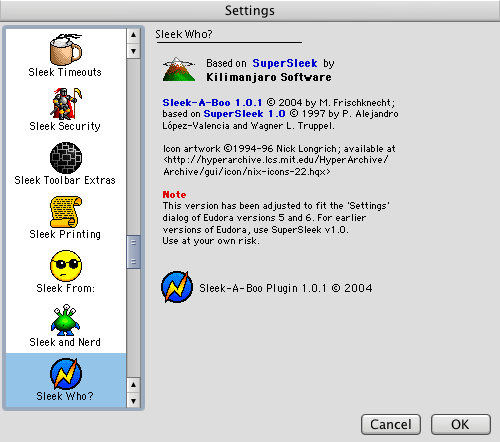
Here's a snapshot of the one entry (the last one) where no settings can be
changed because it shows the acknowledgements; this is Sleek-A-Boo running
under Eudora X 6.0.2 (and a non-standard OS theme, which explains the looks
of the title bar, scroll arrows and dialog background;
not everyone likes stripes...)
Suggestions for changes and additions are welcome (just go to the contact
form).
PS: Probably all of the settings available in SuperSleek/Sleek-A-Boo are
also accessible through the <x-eudora-setting> mechanism; it's just that
sometimes
it's easier to change them through Eudora's "Settings" dialog.
[Back to main Macintosh page.]